Messenger Welcome Trigger is used to activate the scenario for customers who message the Facebook page for the first time.
The Messenger Welcome Trigger has two options:
- “Get Started” Button: This option allows you to set a button that customers can click to begin interacting with the chatbot.
- Quick Question: This option allows you to ask a quick question to engage the customer right from the start.

All Facebook pages connected to SmaxAi should create a Messenger Welcome Trigger and enable the “Get Started” button for the chatbot to function optimally.
Note: Each Facebook page can only have one Messenger Welcome Trigger. You can only enable one of the two options: either the “Get Started” button or the quick question.
“Get Started” Button #
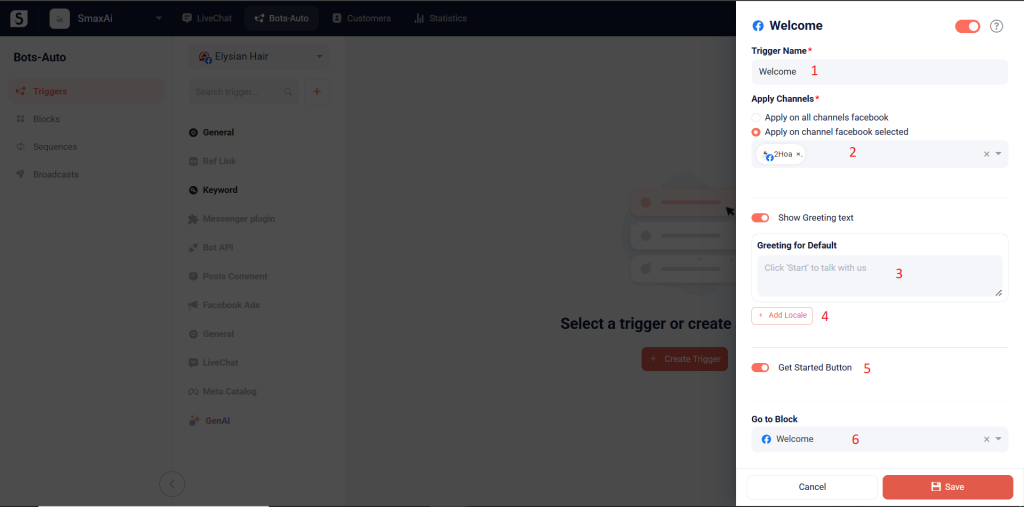
(1) Trigger Name: Enter the trigger name
(2) Apply Channels: Choose the channel(s) where this trigger will be active.
(3) Show Greeting text: This message will appear above the “Get Started” button when a customer sends a message for the first time.
(4) Add Locale: Select the language you want the greeting to appear in
(5) Get Started Button: Enable this toggle to display the “Get Started” button
(6) Go to Block: Select the block you want to send when customer click “Get Started” button
Quick Question #
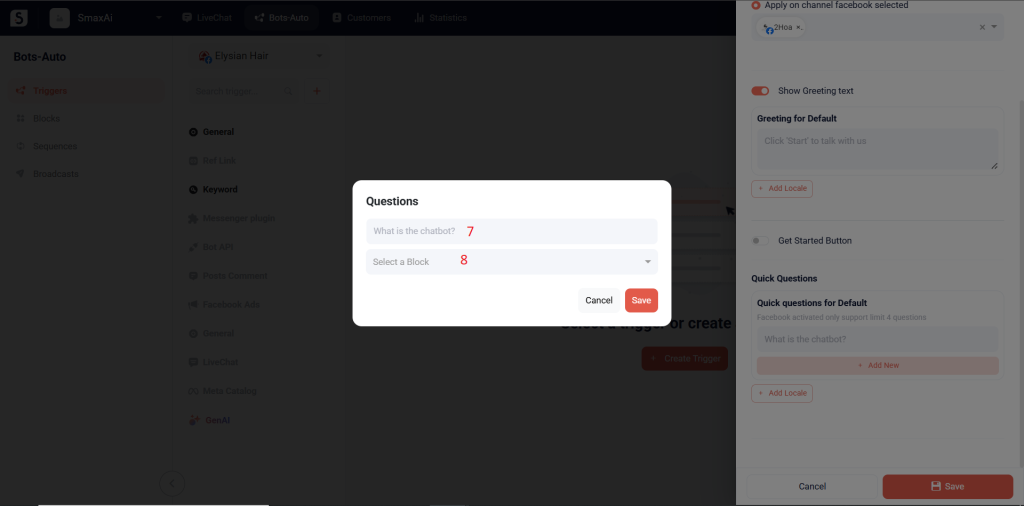
To create quick questions, you must disable “Get Started” Button.
(7) Enter the question content
(8) Select the block that will be triggered when customers select this question