Skip to content
Test Store

Test Store

  • Blog
  • About Us
  • Solution
    • Apparel & fashion
    • Home & Garden
    • Beauty & Personal Care
    • Food and Beverage
  • Help Center

Getting Started

5
  • Template Library
  • Creating Biz
  • Module Introduction
  • Explain the service package
  • Biz API

Live Chat

20
  • FollowUp
  • Chat Session
  • Bot
  • Overview
  • Merged Channel
  • Conversation filter
  • Tags
  • Message Templates
  • Internal Messages
  • Meta Conversion API
  • Add new channel
    • Telegram
    • WhatsApp
    • Tiktok User
    • Line
    • Website
    • Instagram
    • Facebook
  • Conversation Role
    • Manual splitting
    • Automatic allocating
    • Configure roles

Bot-Auto

138
  • Introduction to Bot Automation
  • Blocks
  • Sequences
  • Broadcast Sending
  • Advance Filters
  • Funtions
  • Trigger List
    • View List of Triggers
    • Facebook
      • Messenger Welcome Message
      • GenAI
      • Messenger Shopping
      • LiveChat Tags
      • Bot API
      • Click To Message
      • Messenger Persistent Menu
      • Comment
      • Keywords
      • Messenger Ref Link
      • Messenger Default
      • Messenger Welcome
    • LINE
      • Trigger Tag
      • Bot API
      • Group GenAI
      • GenAI
      • Group Keywords
      • Keywords
      • Line Group Default
      • Line Default
      • Line Group Welcome
      • Line Welcome
    • Tiktok User
      • Trigger Tag
      • Bot API
      • GenAI
      • Keywords
      • Tiktok User Default
      • Tiktok User Welcome
    • Instagram
      • GenAI
      • LiveChat Tags
      • Bot API
      • Instagram Persistent Menu
      • Comment
      • Keywords
      • Instagram Ref Link
      • Instagram Default
      • Instagram Welcome
    • Telegram
      • LiveChat Tags
      • Bot API
      • Gen AI
      • Keywords
      • Telegram Welcome
      • Telegram Default
    • Website
      • Trigger Tag
      • Bot API
      • GenAI
      • Keywords
      • Website Default
      • Website Welcome
  • Functional Card
    • LINE
      • Line Template
      • Line Quick Reply
      • Line User Input
      • Line Image
      • Line Text
    • Facebook
      • Messenger Shopify Order Details
      • Add Album
      • Messenger Template
      • Messenger Receipt
      • Messenger Product
      • Messenger CAPI
      • Messenger Handover
      • Messenger Marketing Message
      • Messenger Attach File
      • Messenger Audio
      • Messenger Video
      • Messenger Feedback
      • Messenger Media
      • Facebook Audience
      • Facebook Comment
      • Messenger Block/Unblock
      • Messenger Shipping
      • Messenger User Input
      • Messenger Typing
      • Messenger Gallery
      • Messenger Quick Reply
      • Messenger Image
      • Messenger Text
    • WhatsApp
      • WhatsApp Document
      • WhatsApp Template
      • WhatsApp User Input
      • WhatsApp Audio
      • WhatsApp Video
      • WhatsApp Image
      • WhatsApp Interactive
      • WhatsApp Text
    • Instagram
      • Instagram Shopify Order Details
      • Instagram Audio
      • Instagram User Input
      • Instagram Video
      • Instagram Gallery
      • Instagram Image
      • Instagram Text
    • Website
      • Website Text
      • Website Image
      • Website Gallery
      • Website User Input
      • Website Quick Reply
    • Tiktok Shop
      • Tiktok Shop Image
      • Tiktok Shop Text
    • TiktokUser
      • TiktokUser User Input
      • TiktokUser Text
    • Advanced Cards
      • Shopify
      • Change Tags
      • Custom Image
      • Open Gift / Add Turn Number
      • Find Customer
      • Thread Note
      • Assign to Staff
      • GenAI
      • Note
      • Follow Up
      • Thread Status
      • On/Off Bot
      • Go To Block
      • JsonAPI
      • Delay
      • Sequence
      • Set Attributes
      • Parse Content
      • Google Sheet
      • Send QR
      • Send Email
      • Check Time Range
      • Time Calculator
      • Send Block
      • A/B Testing
      • Input/Output
      • Table Data
      • Lucky Wheel/ Add Turn Number
    • Telegram
      • Telegram Image
      • Telegram Text

Customers

5
  • Customer Profile Panel
  • Export
  • Import
  • Segments
  • Customer Search

Settings

25
  • Edit Your Business
  • Channels
  • Members
  • Webview Domains
  • Attributes
  • Tags
  • Message Templates
  • API
  • Packages
  • Logs
  • Integration
    • Internal form
    • DeepSeek
    • XAI (Grok 3)
    • Claude
    • Gemini
    • Google Sheet
    • SMTP
    • Embedded Form
    • Groq
    • OpenAI
    • Shopify
      • Connect to Product Management Module
      • Connect to Order Management Module
      • Connect to Chatbot
      • Use Shopify in Live Chat Module
      • Intergrate Shopify

Extend Modules

49
  • Messenger Templates
  • Selling Page
  • WhatsApp Template
  • Quizzes
  • Order Management
  • Meta Catalogs
  • Marketing Messages
  • Meta CAPI
  • Products
  • Meta Custom Audience
  • Email Builder
    • Activate Email Builder
    • Connecting and Using Email Builder
    • Edit Email Interface
  • Customize Image
    • Activate Customize Image
    • Create Personalized Image
    • Layer Configuration
  • Follow Up
    • Follow Up Using GenAI
    • Follow Up Content
    • Activate Follow Up
    • Connecting to Chatbot
    • Follow Up Settings
  • Gift Opening Game
    • Activate Gift Opening Game
    • Connecting to Chatbot
    • Content Configuration
    • Edit Gift
    • Open Gift Design
    • Notification Configuration
  • Lucky Wheel
    • Activate Lucky Wheel
    • Connecting to Chatbot
    • Content Configuration
    • Edit Prizes
    • Spinner Design
    • Spinner Configuration
  • Form Builder
    • Activate Form Builder
    • Connecting to Chatbot
    • Form Configuration
    • Element Configuration
  • Data Table
    • Data Table Use Cases
    • Data Table Setup
  • GenAI
    • Demo and Review
    • Config
    • Prompts
    • Create GenAI Agents
    • AI Agent Types
      • Translate
      • Post Content
      • Quiz Maker
      • Conversation Note
      • Message Content
      • AI Chatbot

Statistic

5
  • Interactive
  • Tags
  • Marketer
  • Supporter
  • Customers
View Categories
  • Home
  • Help Center
  • Settings
  • Edit Your Business

Edit Your Business

Est reading time: < 1 min read

1. Edit Information #

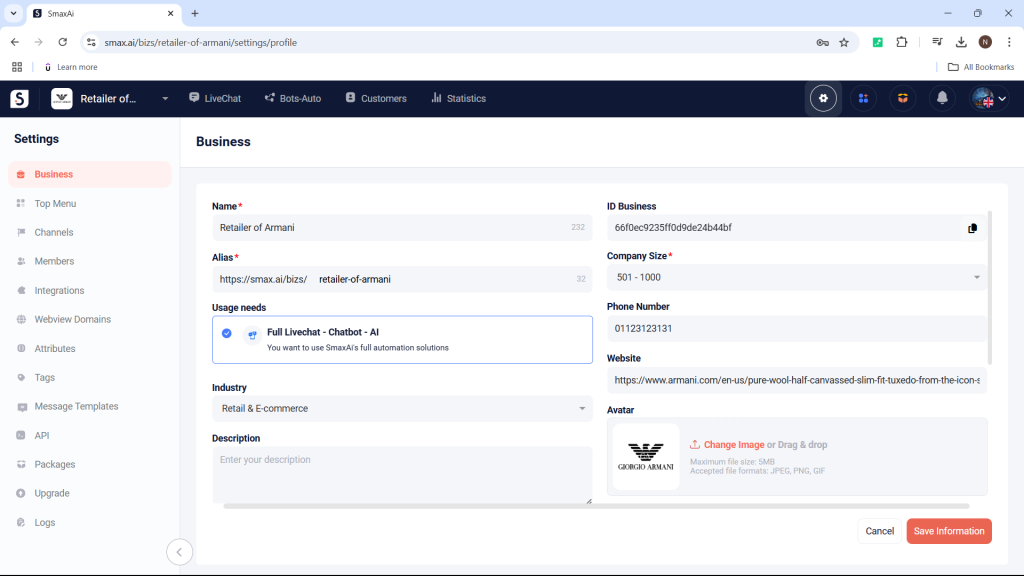
In the Business Settings, you can edit various details about your business, such as:

  • Name
  • Phone number
  • Alias
  • Website
  • Industry
  • Company size
  • Description
  • Profile picture
  • Address: Country, district, city
  • Zip Code
  • Time zone

After making your edits, select Save Information to save the changes.
2. General Settings #

2.1 Domain Whitelisting #

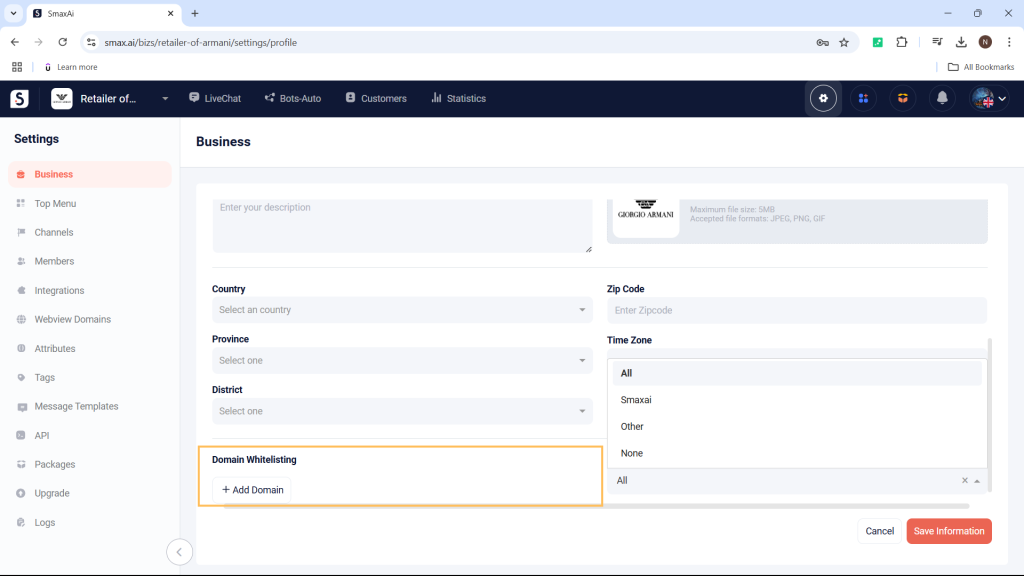
Domain Whitelisting is a list of domains that are allowed to open as PopUps (windows) on Messenger. When you add a domain to the Domain Whitelisting in the Business Settings, it will be applied to all of your pages.
2.2 Auto Mark Messages as Read #

When messages are sent from the Bots-Auto module or from other platforms, the system will automatically mark the conversation as unread in the LiveChat module to prevent staff from overlooking messages.

You can enable the Auto mark read thread setting to skip messages sent from Bots-Auto or other platforms:

  • All: Applies to messages sent from both Bot – Auto and other platforms.
  • Smax: Applies only to messages sent from Bot – Auto.
  • Other: Applies only to messages sent from other platforms.
  • None: Does not apply to any messages.
Updated on 02/08/2025

What are your Feelings

  • Happy
  • Normal
  • Sad

Share This Article :

  • Facebook
  • X
  • LinkedIn
  • Pinterest
LogsChannels

Leave a Comment Cancel reply

Table of Contents
  • 1. Edit Information
  • 2. General Settings
    • 2.1 Domain Whitelisting
    • 2.2 Auto Mark Messages as Read
© 2026 Test Store • Built with GeneratePress